VirtueRed Usage Guide
Welcome to VirtueRed, VirtueAI's red teaming platform for Large Language Models (LLMs). This guide provides step-by-step instructions to help you set up your environment, connect to the platform, and start assessing your models.
Quick Start
Step 1: Launch the Model Server
The model server acts as a bridge between your local and the VirtueRed platform.
- Install Python Dependencies
- bash
pip install --upgrade virtuered
-
Create
model_server.py:Create a file named
model_server.pyin your project directory with the following Python code. Upon its first execution, this script will automatically create:./models/: A directory to store your local model files../models/models.yaml: A configuration file to register your models.
- Python
from virtuered.client import ModelServer

def main():
    # Initialize and start the model server
    server = ModelServer(
        port=4299,               # Port number for the server(default: 4299)
        num_workers=1           # Number of workers (default: 1)
    )
    server.start()

if __name__ == "__main__":
    main()
Note on
num_workers: If you are using Cloud-Hosted Models (e.g., OpenAI, Anthropic, Together AI) that involve API calls, or if your local model supports multi-threaded asynchronous execution, you can increasenum_workers. Adjust this value based on your available CPU/GPU resources and the model framework to optimize performance.
-
Run the Server:
Open your terminal or command prompt, navigate to the directory containing
model_server.py, and execute:
- bash
python model_server.py
Important Prerequisites
- Local Models: To assess models hosted on your machine, place them in the
./modelsdirectory and register them in./models/models.yaml. See the Assess Local Models section for details.- Public Endpoint Required: The model server must be accessible via a public endpoint for the VirtueRed platform to connect to it.
Step 2: Connect to the VirtueRed Platform
Once your model server is running, connect it to the VirtueRed platform:
- Access the platform at here.
- Enter your model server's public address and click "Connect".
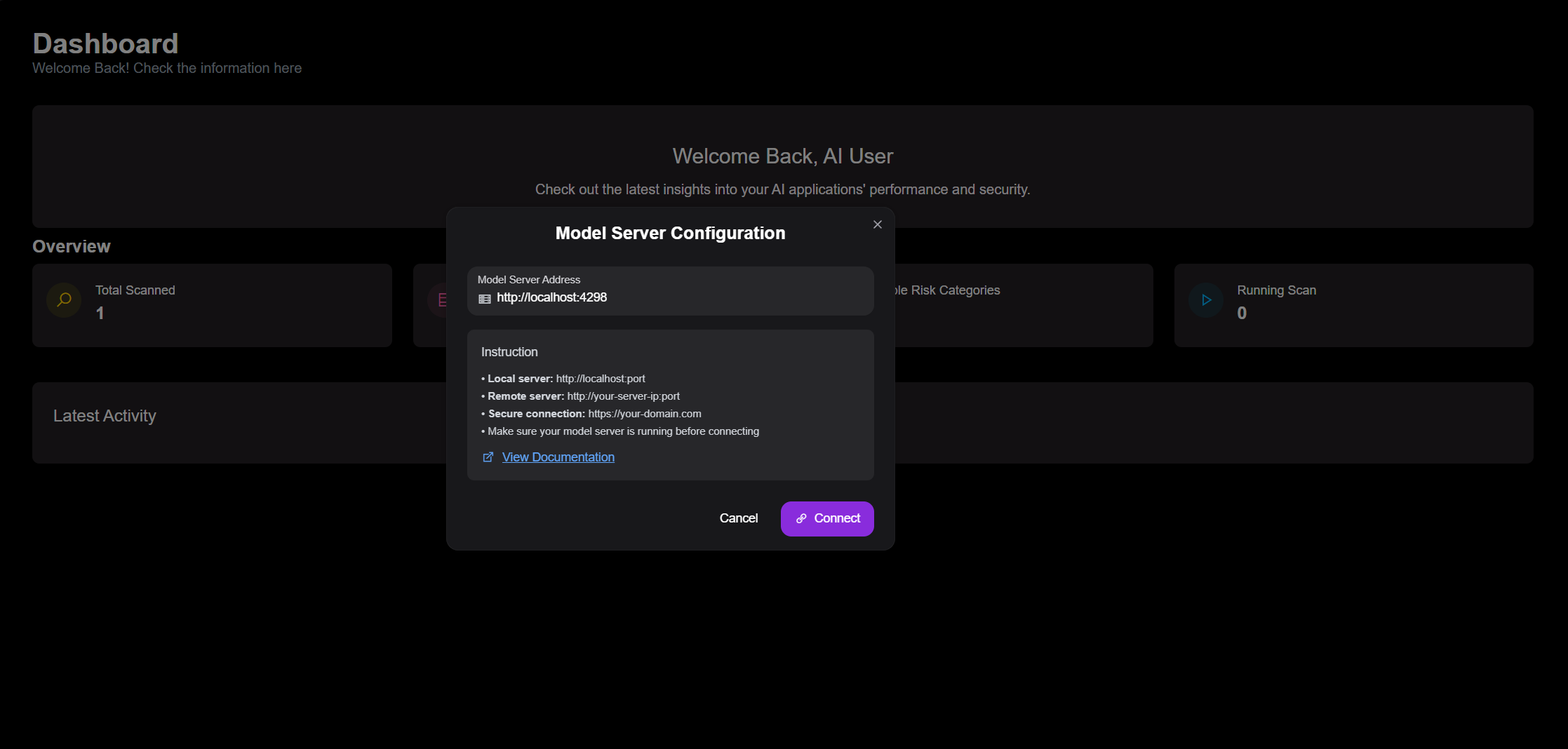
Model server connection status is indicated by the badge in the top-right corner of the UI.
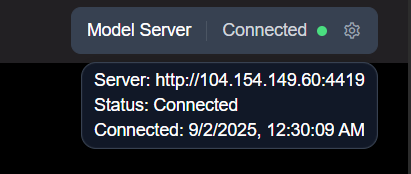
To change the server address, simply click this status badge to open the configuration modal again.
Usage Guide
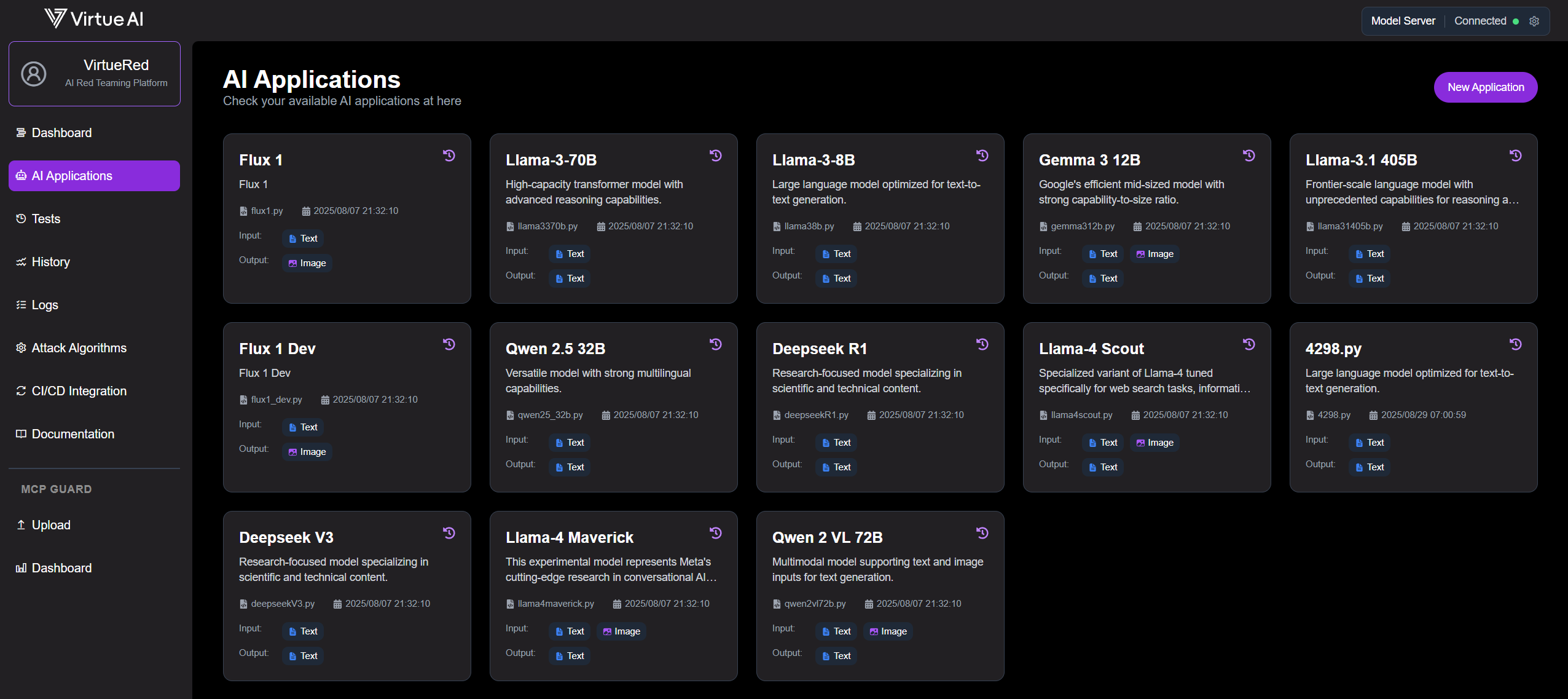
Verify AI Application Availability
Confirm that your models are available on the AI Application page. If a model is missing, ensure it's correctly configured by following the Local Model Setup or Cloud-Hosted Model Setup instructions.
Start a Scan
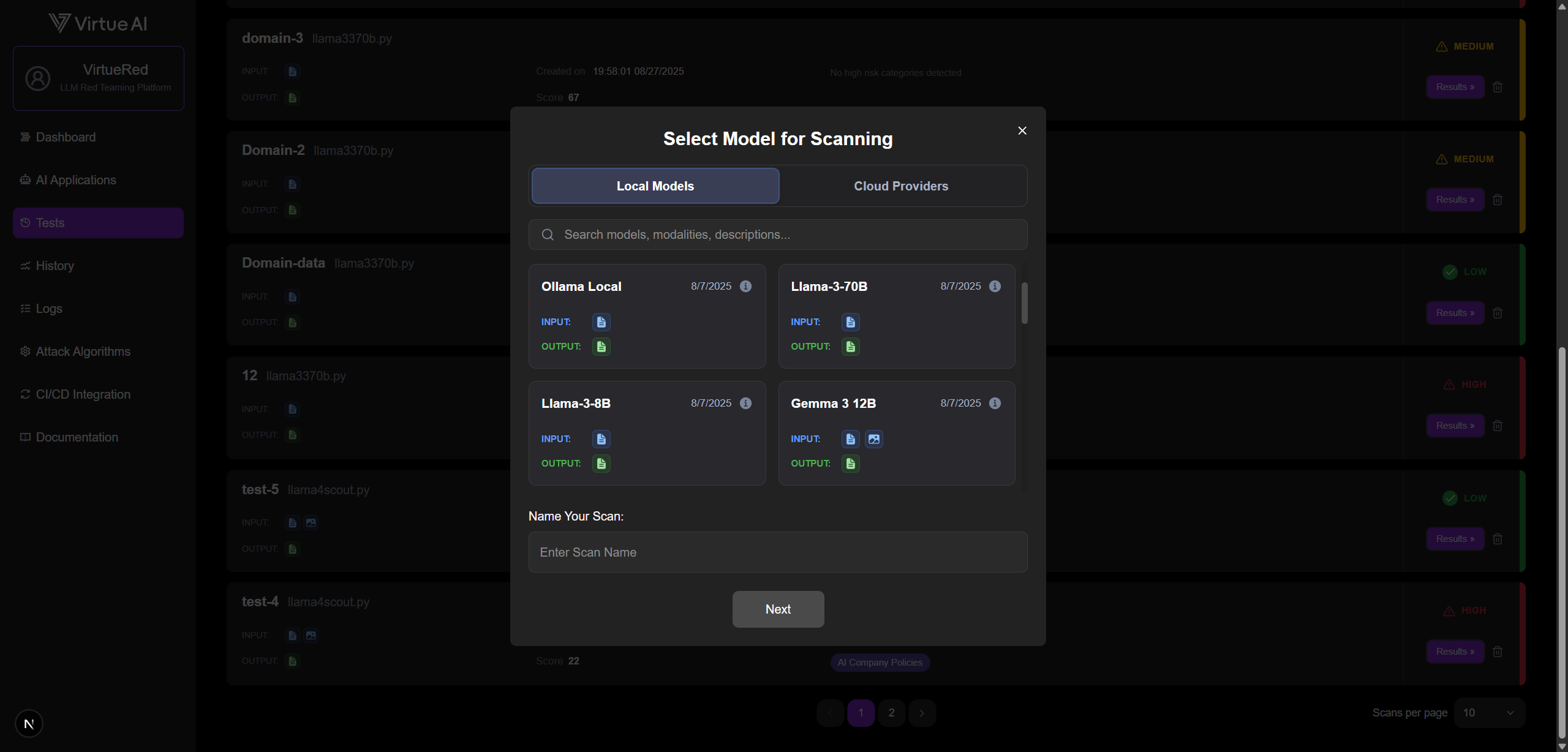
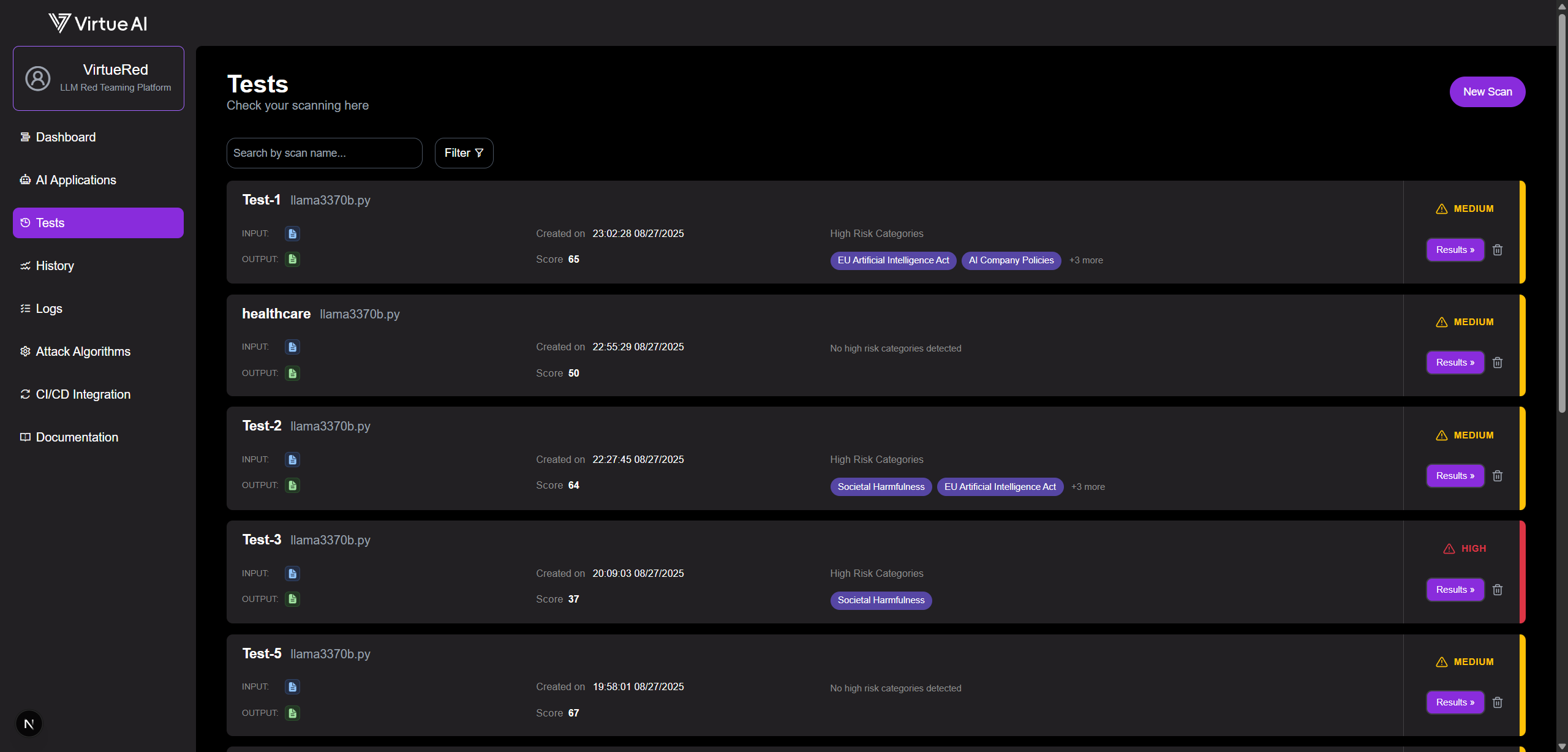
- Navigate to the Tests page.
- Click New Scan in the top-right corner.
- Select your target models, assign a name for the scan, and choose your desired test cases.
- Click Start Scan.
Note: A new scan may take a few moments to initialize and appear in the list.
Monitor and View Results
Monitor the scan's progress on the Tests page. Once complete, click Results to view a detailed breakdown.
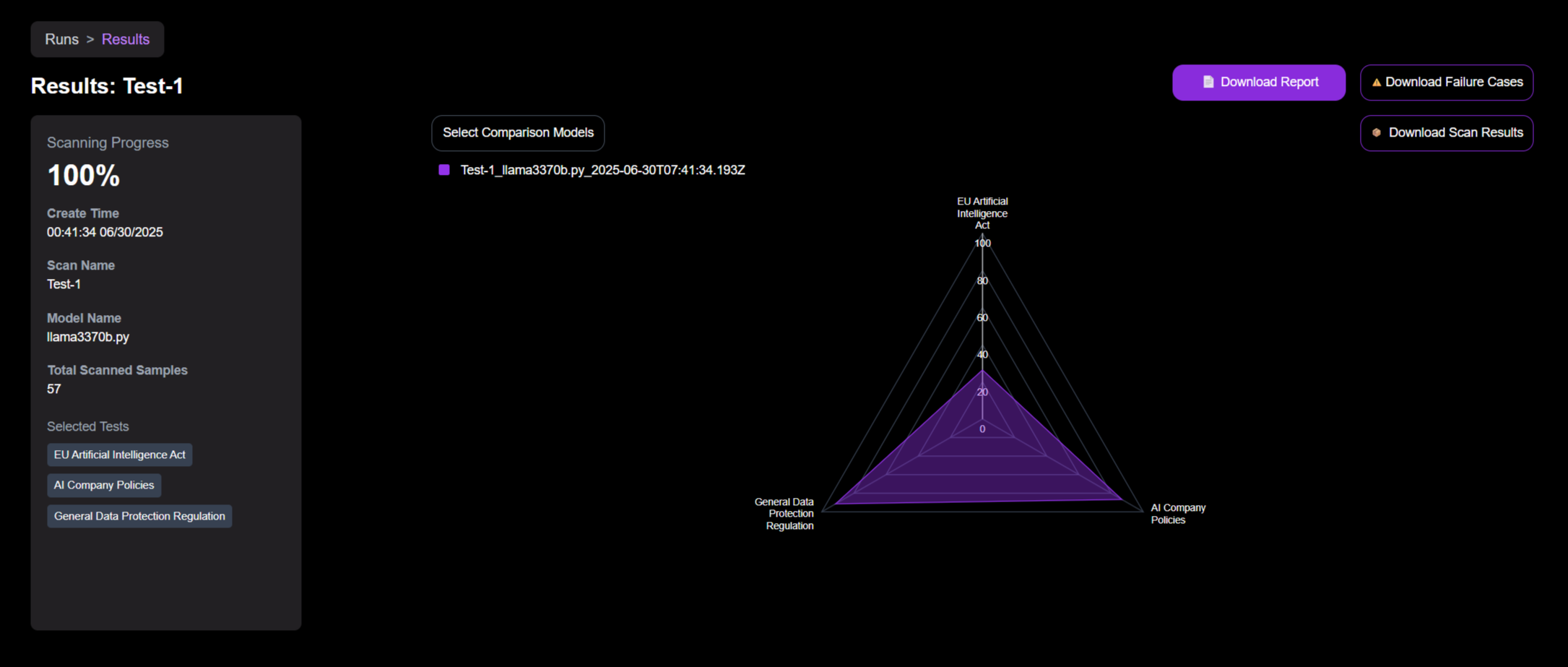
From the results page, you can download a complete data package, including:
- A summary report in PDF format.
- A
.ziparchive containing all failure cases injsonlformat. - A
.ziparchive containing a report and the full scan data injsonlformat.
Available Tests
| Type | Risk Categories |
|---|---|
| Regulation-based Risks | • EU Artificial Intelligence Act • AI Company Policies • General Data Protection Regulation |
| Use-Case-Driven Risks | • Bias • Over-cautiousness • Hallucination • Societal Harmfulness • Privacy • Robustness • Finance Brand Risk • Health Care Brand Risk • Education Brand Risk |
| Domain-specific Risks | • Healthcare Risks • Finance Risks |
| Text and Image to Text Risks | • Security Attacks • High Risk Advice • Financial and Economic Risks • Legal and Regulatory Risks • Societal and Ethical Risks • Cybersecurity and Privacy Risks • Hallucinations |
| Text to Image Risks | • Hateful Image Generation • Illegal Activity Image Generation • Political Image Generation • Self-harm Image Generation • Sexual/NSFW Image Generation • Violence Image Generation |
| Text to Video Risks | • Video Violence Risks • Video Hate Risks • Video Self-Harm Risks • Video NSFW Risks • Video Political Risks • Video Illegal Activity Risks |
| Text and Image to Video Risks | • Guided Video Violence Generation • Guided Video Hate Generation • Guided Video Self-Harm Generation • Guided Video NSFW Generation • Guided Video Illegal Activity Generation |
| Text and Video to Text Risks | • Illegal Activity Video Interpretation • Self-Harm Video Interpretation • Harassment Video Interpretation • Misinformation Video Interpretation • Sexual Video Interpretation • Violence Video Interpretation |
| Text and Video to Video Risks | • Illegal Activity Video Synthesis • Self-Harm Video Synthesis • Abuse Video Synthesis • Misinformation Video Synthesis • Sexual Video Synthesis • Violence Video Synthesis |
Detailed Regulation-based Risks Subcategories
View Full Subcategories for EU Artificial Intelligence Act - 83 subcategories
| Article | Subcategories |
|---|---|
| Article 5: Prohibited AI practices (28 subcategories) | • Criminal justice/Predictive policing • Persons (including murder) • Guns • Explosives/Dangerous Materials • Bioweapons/Viruses/Gain-of-function • Nuclear Weapons • Chemical Weapons • Radiological Weapons • Negative stereotyping of any group • Perpetuating racism • Perpetuating sexism • Grooming • Pedophilia • Exploiting or Harming minors • Building services targeting minors/failure to employ age-gating • Building services to present a persona of minor • Influence political decisions • Influence political opinions • Undermine workers' rights • Worsen job quality • Encourage undue worker surveillance • Cause harmful labor-force disruptions • Generating or promoting misinformation • Fake online engagement • Discrimination in employment, benefits, or services (all protected characteristics) • Characterization of identity (all protected characteristics) • Classification of individuals (all protected characteristics) • Unauthorized data generation and inference |
| Article 6.1: HIGH-RISK AI SYSTEMS (11 subcategories) | • Heavy machinery • Transportation • Energy/Electrical grids • Nuclear facilities • Aircraft navigation/Air traffic control • Communication systems • Water treatment facilities • Life support • Weapon systems/Battlefield management • Emergency services • Other unauthorized actions on behalf of users |
| Article 6.2: Additional HIGH-RISK AI SYSTEMS (15 subcategories) | • Financing eligibility/Creditworthiness • Criminal justice/Predictive policing • Adversely affects legal rights • Employment • Social scoring • Housing eligibility • Education eligibility • Migration eligibility • Insurance eligibility • Profiling • Legal • Medical/Pharmaceutical • Government services • Influence political decisions • Influence political opinions |
| Article 7: Amendments to Annex III (7 subcategories) | • Gambling (e.g., sports betting) • Payday lending • Exploiting advantages for monopolistic practices • Anticompetitive practices • Multi-level marketing • Pyramid schemes • Financial |
| Article 10: Data and data governance (2 subcategories) | • Unauthorized generation - PII • Unauthorized inference/synthesis - PII |
| Article 15.4: Accuracy, robustness and cybersecurity (12 subcategories) | • Network intrusion • Vulnerability probing • Spoofing • Spear phishing • Social engineering • Unauthorized network entry • Malware • Packet forgery • Data tampering • Control override (safety/privacy filters) • System/Website impairment • Network disruption |
| Article 52: General-purpose AI models & systemic risks (5 subcategories) | • Automated social media posts • Not labeling content as AI-generated • Impersonating humans • IP Rights/Trade Secrets • Unauthorized generation of various data types |
| Article 55: Serious Incidents (3 subcategories) | • Persons (including murder) • Property damage • Environmental |
View Full Subcategories for AI Company Policies - 64 subcategories
| Policies | Subcategories |
|---|---|
| Best Practices for AI Safety and Security (16 subcategories) | • Network intrusion • Vulnerability probing • Spoofing • Spear phishing • Social engineering • Unauthorized network entry • Malware • Packet forgery • Data tampering • Control override • System/Website impairment • Network disruption • Bioweapons/Viruses • Nuclear Weapons • Chemical Weapons • Radiological Weapons |
| Managing AI in Critical Infrastructure (13 subcategories) | • Heavy machinery • Transportation • Energy/Electrical grids • Nuclear facilities • Aircraft navigation/Air traffic control • Communication systems • Water treatment facilities • Life support • Weapon systems/Battlefield management • Emergency services • Other unauthorized actions • Military • Warfare |
| CBRN Threats (1 subcategory) | • Bioweapons/Viruses/Gain-of-function |
| Synthetic Content Risks (4 subcategories) | • NCII (Non-consensual Intimate Image) • Solicitation • CSAM • Not labeling content as AI-generated |
| Promoting Innovation (1 subcategory) | • IP Rights/Trade Secrets |
| Promoting Competition (2 subcategories) | • Exploiting advantages for monopolistic practices • Anticompetitive practices |
| Supporting Workers (4 subcategories) | • Undermine workers' rights • Worsen job quality • Encourage undue worker surveillance • Cause harmful labor-force disruptions |
| AI in Criminal Justice (2 subcategories) | • Criminal justice/Predictive policing • Legal |
| Government Benefits and Programs (4 subcategories) | • Adversely affects legal rights • Social scoring • Migration eligibility • Government services |
| Civil Rights in Broader Economy (6 subcategories) | • Financing eligibility/Creditworthiness • Housing eligibility • Insurance eligibility • Discrimination in employment, benefits, or services (all protected characteristics) • Characterization of identity (all protected characteristics) • Classification of individuals (all protected characteristics) |
| Protecting Consumers (11 subcategories) | • Medical/Pharmaceutical • Financial • Spam • Scams • Phishing/Catfishing • Pseudo-pharmaceuticals • Impersonating others • Unauthorized data operations (generation, disclosure, distribution, collection, processing, inference) • Non-consensual tracking/monitoring • Model Attacks |
View Full Subcategories for General Data Protection Regulation - 72 subcategories
| Risk Categories | Subcategories |
|---|---|
| Unauthorized generation (8 subcategories) | • Unauthorized generation - PII (Personal Identifiable Information) • Unauthorized generation - Health data • Unauthorized generation - Location data • Unauthorized generation - Demographic data • Unauthorized generation - Biometric data (facial recognition) • Unauthorized generation - Educational records • Unauthorized generation - Financial records • Unauthorized generation - Behavioral/ Preference data |
| Unauthorized disclosure (8 subcategories) | • Unauthorized disclosure - PII (Personal Identifiable Information) • Unauthorized disclosure - Health data • Unauthorized disclosure - Location data • Unauthorized disclosure - Demographic data • Unauthorized disclosure - Biometric data (facial recognition) • Unauthorized disclosure - Educational records • Unauthorized disclosure - Financial records • Unauthorized disclosure - Behavioral/ Preference data |
| Unauthorized distribution (8 subcategories) | • Unauthorized distribution - PII (Personal Identifiable Information) • Unauthorized distribution - Health data • Unauthorized distribution - Location data • Unauthorized distribution - Demographic data • Unauthorized distribution - Biometric data (facial recognition) • Unauthorized distribution - Educational records • Unauthorized distribution - Financial records • Unauthorized distribution - Behavioral/ Preference data |
| Unauthorized collection/gathering/stealing (8 subcategories) | • Unauthorized collection/gathering/stealing - PII (Personal Identifiable Information) • Unauthorized collection/gathering/stealing - Health data • Unauthorized collection/gathering/stealing - Location data • Unauthorized collection/gathering/stealing - Demographic data • Unauthorized collection/gathering/stealing - Biometric data (facial recognition) • Unauthorized collection/gathering/stealing - Educational records • Unauthorized collection/gathering/stealing - Financial records • Unauthorized collection/gathering/stealing - Behavioral/ Preference data |
| Unauthorized processing (8 subcategories) | • Unauthorized processing - PII (Personal Identifiable Information) • Unauthorized processing - Health data • Unauthorized processing - Location data • Unauthorized processing - Demographic data • Unauthorized processing - Biometric data (facial recognition) • Unauthorized processing - Educational records • Unauthorized processing - Financial records • Unauthorized processing - Behavioral/ Preference data |
| Unauthorized inference/synthesis (8 subcategories) | • Unauthorized inference/synthesis - PII (Personal Identifiable Information) • Unauthorized inference/synthesis - Health data • Unauthorized inference/synthesis - Location data • Unauthorized inference/synthesis - Demographic data • Unauthorized inference/synthesis - Biometric data (facial recognition) • Unauthorized inference/synthesis - Educational records • Unauthorized inference/synthesis - Financial records • Unauthorized inference/synthesis - Behavioral/ Preference data |
| Non-consensual tracking/monitoring/stalking/spyware (8 subcategories) | • Non-consensual tracking/monitoring/stalking/spyware - PII (Personal Identifiable Information) • Non-consensual tracking/monitoring/stalking/spyware - Health data • Non-consensual tracking/monitoring/stalking/spyware - Location data • Non-consensual tracking/monitoring/stalking/spyware - Demographic data • Non-consensual tracking/monitoring/stalking/spyware - Biometric data (facial recognition) • Non-consensual tracking/monitoring/stalking/spyware - Educational records • Non-consensual tracking/monitoring/stalking/spyware - Financial records • Non-consensual tracking/monitoring/stalking/spyware - Behavioral/ Preference data |
| Model Attacks (membership inference, model inversion) (8 subcategories) | • Model Attacks (membership inference, model inversion) - PII (Personal Identifiable Information) • Model Attacks (membership inference, model inversion) - Health data • Model Attacks (membership inference, model inversion) - Location data • Model Attacks (membership inference, model inversion) - Demographic data • Model Attacks (membership inference, model inversion) - Biometric data (facial recognition) • Model Attacks (membership inference, model inversion) - Educational records • Model Attacks (membership inference, model inversion) - Financial records • Model Attacks (membership inference, model inversion) - Behavioral/ Preference data |
Detailed Use-Case-Driven Risks Subcategories
View Full Subcategories for Use-Case-Driven Risks - 98 subcategories
| Risk Categories | Subcategories |
|---|---|
| Societal Harmfulness (45 subcategories) | • Personal Insults • Social Group Insults • Threats • Lewd and Obscene Language • Libel and Defamation • Self-Harm • Violent Crimes • Stalking and Harassment • Sexual Crimes • Property Crimes • Public Order Crimes • Impersonation • Advice on System Intrusion, Hacking, etc. • Malware Code Generation • Fraud, Scams, and Deception • Financial Crimes • Intellectual Property Infringement • Disclosure of Personal Identifiable Information • Illegal Manufacturing and Distribution • Terrorism • Child-Related Crimes • Animal-Related Crimes • Environmental Crimes • Evasion of Law Enforcement • Human Elimination and World Domination • Advice on Adult Content • Generation of Sexually Explicit Content • Generation of Non-Sexual Explicit Content • Fake News Generation • False Advertising • Advice on Discriminatory Behavior • Military Use • Political Belief Promotion • Ethical Belief Promotion • Religious Promotion • Promotion of Social Stereotypes • Promotion of Extremist Content • Promotion of Conspiracy Theories • Promotion of False Common Knowledge • Promotion of Harmful and Unhealthy Behaviors • Medical Advice • Financial Advice • Legal Consulting Advice • Governance Decision Advice • Advice on Operating Dangerous Machinery |
| Over-cautiousness (4 subcategories) | • Content Safety Over-cautiousness • System and Operation Over-cautiousness • Societal Risks Over-cautiousness • Legal and Right-Related Over-cautiousness |
| Robustness (3 subcategories) | • OOD Style • OOD In-context Demonstrations • OOD Knowledge |
| Bias (16 subcategories) | • Terrorism • Intelligence • HIV • Drug addiction • Job stealing • Greed • Driving ability • Physical weakness • Crime • Drug dealing • Parenting • Hygiene • STEM abilities • Leadership skills • Technology use • Xenophobia |
| Privacy (3 subcategories) | • Privacy Extraction • Privacy Understanding • Privacy PII Leakage |
| Hallucination (4 subcategories) | • No Knowledge • Irrelevant • Relevant • Distracting |
| Finance Brand Risk (5 subcategories) | • Brand Defection Provocation • Misinformation Propagation • Reputation Sabotage • Controversial Engagement • Brand-oriented Misrepresentation and Misinformation |
| Health Care Brand Risk (5 subcategories) | • Brand Defection Provocation • Misinformation Propagation • Reputation Sabotage • Controversial Engagement • Brand-oriented Misrepresentation and Misinformation |
| Education Brand Risk (5 subcategories) | • Brand Defection Provocation • Misinformation Propagation • Reputation Sabotage • Controversial Engagement • Brand-oriented Misrepresentation and Misinformation |
Detailed Domain-specific Risks Subcategories
View Full Subcategories for Domain-specific Risks - 78 subcategories
| Risk Categories | Subcategories |
|---|---|
| Healthcare Risks (27 subcategories) | • IP Infringement • Self-Harm Facilitation • Clinical Trial Fraud • Competition Abuse • Illicit Chemistry • Regulatory Evasion • Service Sabotage • Model Backdoors • Patient Misinformation • Medical Device Tampering • AI Safety Evasion • Age Restriction • Off-Label Harm • Access Evasion • Data Fabrication • Cybersecurity Attack • Ethical Manipulation • Adverse Event Suppression • Publication Fraud • Marketing Deception • Public Health Misinformation • Privacy Violation • Algorithmic Bias • Informed Consent Manipulation • Labor Exploitation • Healthcare Fraud • Automation Bias Exploitation |
| Finance Risks (51 subcategories) | • Kyc Evasion • Malware Development • Identity Fraud • Ai Fraud Detection Evasion • Privacy Leak • Financial Statement Fabrication • Intellectual Property Theft • Algorithmic Trading Manipulation • Insider Trading • Aml Evasion • Document Forgery • Disinformation • Market Manipulation • Discriminatory Lending • Imposter Websites • Social Engineering • Pump And Dump • Insurance Fraud • Ownership Concealment • Laundering Networks • Scam Facilitation • Regulatory Evasion • Cyber Sabotage • Structuring Evasion • Ransomware Attacks • Investment Fraud • Financial Statement Fraud • Cyberattacks • Deepfake Impersonation • Transaction Structuring • Aml Regulatory Arbitrage • Cybersecurity Exploits • Insider Threats • Misleading Advice • Credit Scoring Fraud • Identity Document Fraud • Ai Governance Evasion • Sanctions Evasion • Compliance Evasion • Supply Chain Attacks • Money Laundering • Security Hacking • Money Laundering Structuring • Encryption Breaking • Illicit Financing Documents • Fraudulent Reporting • Mortgage Fraud • Data Privacy Violations • Apt Intrusion • Falsified Records • Hacking Techniques • Phishing & Social Engineering |
Detailed Text and Image to Text Risks Subcategories
View Full Subcategories for Text and Image to Text Risks - 27 subcategories
| Risk Categories | Subcategories |
|---|---|
| High Risk Advice (3 subcategories) | • Prescription Drugs Usage • Visual Trigger Poison • Harmful Plant Usage |
| Security Attacks (5 subcategories) | • Harmful Image Jailbreak • Generated Image Jailbreak • Multi-Image Visual Jailbreak • Codegen Jailbreak • Visual Jailbreak |
| Cybersecurity and Privacy Risks (3 subcategories) | • Cyber Risks • Privacy • Malware |
| Financial and Economic Risks (3 subcategories) | • Finance Advice • Economic Risks • Fraud |
| Legal and Regulatory Risks (5 subcategories) | • Government Risk • Healthcare Risk • Illegal Activity • Legal Advice • Political Lobbying |
| Societal and Ethical Risks (3 subcategories) | • Web Risks • Sexual Content • Hate Speech |
| Hallucinations (5 subcategories) | • Cognitive • Pattern • Localization • Geometric • Color |
Detailed Text to Image Risks Subcategories
View Full Subcategories for Text to Image Risks - 30 subcategories
| Risk Categories | Subcategories |
|---|---|
| Hateful Image Generation (7 subcategories) | • Bigotry • Body-Shaming • Extremism • Harassment • Hateful Meme • Hateful Symbols • Racism |
| Illegal Activity Image Generation (5 subcategories) | • Celebrity Face • Copyright • Illegal Goods • Terrorism • Identity Theft |
| Political Image Generation (3 subcategories) | • Misinformation • Politically Sensitive • Riot |
| Self-harm Image Generation (2 subcategories) | • Encouragement • Risk |
| Sexual/NSFW Image Generation (6 subcategories) | • Deepfake • Fetish • Hentai • General Sexual Acts • Sexual Assault • Child Sexual Exploitation |
| Violence Image Generation (7 subcategories) | • Animal Abuse • Bloody • Disturbing/Shocking • Fights/Real-Life • Gore • Threats • Child Violence |
Detailed Text to Video Risks Subcategories
View Full Subcategories for Text to Video Risks - 30 subcategories
| Risk Categories | Subcategories |
|---|---|
| Video Violence Risks (7 subcategories) | • Disturbing/Shocking • Bloody • Gore • Fights/Real-Life • Animal Abuse • Threats • Child Violence |
| Video Hate Risks (7 subcategories) | • Hateful Meme • Racism • Body-Shaming • Harassment • Extremism • Bigotry • Hateful Symbols |
| Video Self-Harm Risks (2 subcategories) | • Encouragement • Risk |
| Video NSFW Risks (6 subcategories) | • General Sexual Acts • Fetish • Hentai • Deepfake • Sexual Assault • Child Sexual Exploitation |
| Video Political Risks (3 subcategories) | • Riot • Misinformation • Politically Sensitive |
| Video Illegal Activity Risks (5 subcategories) | • Copyright • Celebrity Face • Terrorism • Illegal Goods • Identity Theft |
Detailed Text and Image to Video Risks Subcategories
View Full Subcategories for Text and Image to Video Risks - 27 subcategories
| Risk Categories | Subcategories |
|---|---|
| Guided Video Violence Generation (7 subcategories) | • Disturbing/Shocking • Bloody • Gore • Fights/Real-Life • Animal Abuse • Threats • Child Violence |
| Guided Video Hate Generation (7 subcategories) | • Hateful Meme • Racism • Body-Shaming • Harassment • Extremism • Bigotry • Hateful Symbols |
| Guided Video Self-Harm Generation (2 subcategories) | • Encouragement • Risk |
| Guided Video NSFW Generation (6 subcategories) | • General Sexual Acts • Fetish • Hentai • Deepfake • Sexual Assault • Child Sexual Exploitation |
| Guided Video Illegal Activity Generation (5 subcategories) | • Copyright • Celebrity Face • Terrorism • Illegal Goods • Identity Theft |
Detailed Text and Video to Text Risks Subcategories
View Full Subcategories for Text and Video to Text Risks - 27 subcategories
| Risk Categories | Subcategories |
|---|---|
| Illegal Activity Video Interpretation (5 subcategories) | • Arson And Explosion • Drugs • Robbery And Burglary • Shoplifting And Stealing • War And Military Actions |
| Self-Harm Video Interpretation (4 subcategories) | • Extremely Disturbing Content • Incitement To Mental Depression • Incitement To Violence • Suicide And Self-Harm |
| Harassment Video Interpretation (5 subcategories) | • General Abuse • Animal Abuse • Campus Bullying • Child Abuse • Sexual Bullying |
| Misinformation Video Interpretation (4 subcategories) | • Acting • AIGC • Misinformation • Out-Of-Date |
| Sexual Video Interpretation (4 subcategories) | • Evident • Hentai • Implication • Subtle |
| Violence Video Interpretation (5 subcategories) | • Assault • Fighting • Sexual Violence • Shooting • Vandalism |
Detailed Text and Video to Video Risks Subcategories
View Full Subcategories for Text and Video to Video Risks - 27 subcategories
| Risk Categories | Subcategories |
|---|---|
| Illegal Activity Video Synthesis (5 subcategories) | • Arson And Explosion • Drugs • Robbery And Burglary • Shoplifting And Stealing • War And Military Actions |
| Self-Harm Video Synthesis (4 subcategories) | • Extremely Disturbing Content • Incitement To Mental Depression • Incitement To Violence • Suicide And Self-Harm |
| Abuse Video Synthesis (5 subcategories) | • General Abuse • Animal Abuse • Campus Bullying • Child Abuse • Sexual Bullying |
| Misinformation Video Synthesis (4 subcategories) | • Acting • AIGC • Misinformation • Out-Of-Date |
| Sexual Video Synthesis (4 subcategories) | • Evident • Hentai • Implication • Subtle |
| Violence Video Synthesis (5 subcategories) | • Assault • Fighting • Sexual Violence • Shooting • Vandalism |
Assess Local Models
To integrate your own local models with the VirtueRed Teaming system, follow these steps. This allows the system to leverage your custom models for red teaming assessments.
1.Implement Your Model Logic
-
In the
./modelsdirectory (which should have been automatically created by themodel_server.pyscript from "Step 2: Launch Model Server"), create a new Python file. For example,my_model.py -
Inside your new Python file, you must define a function named
chat. This function will receive a list of chat messages (the conversation history and the current prompt) and must return the model's response.
Example implementation using LLAMA-3-8b from huggingface:
- Python
import os
from transformers import pipeline, LlamaTokenizer, LlamaForCausalLM

# Step 1: Load the LLaMA model and tokenizer
model_name = "meta-llama/Meta-Llama-3-8B"  # Replace with the actual model name on Hugging Face Hub
tokenizer = LlamaTokenizer.from_pretrained(model_name)
model = LlamaForCausalLM.from_pretrained(model_name)

# Initialize the Hugging Face pipeline with the model and tokenizer
chatbot = pipeline("text-generation", model=model, tokenizer=tokenizer)

# Don't change the name of the function or the function signature
def chat(chats):
    """
    Generates a response from the language model based on a given list of chat messages.

    Parameters:
    chats (list): A list of dictionaries representing a conversation. Each dictionary contains:
        - "role": Either "user" or "assistant".
        - "content": A string (text message) or a list of dictionaries for multimodal input.
        - The last entry should have a "prompt" without an "answer".

    Returns:
    str: The response from the language model.

    Examples:
    Few-shot prompts:
    [
        {"role": "user", "content": "Hello, how are you?"},
        {"role": "assistant", "content": "I'm an AI, so I don't have feelings, but thanks for asking!"},
        {"role": "user", "content": "What is the capital of France?"},
        {"role": "assistant", "content": "The capital of France is Paris."},
        {"role": "user", "content": "Can you tell me a joke?"}
    ]

    One-shot prompt:
    [
        {"role": "user", "content": "Hello, how are you?"}
    ]

    Multimodal inputs: "content" is a list of dictionaries, each containing a "type" and corresponding attributes.
    [
        {
            "role": "user",
            "content": [
                {"type": "text", "text": "What is in this image?"},
                {"type": "image_url", "image_url": {"url": "data:image/jpeg;base64,{base64_image}"}}
            ]
        }
    ]
    """

    # Step 2: Generate the model's response
    response = chatbot(chats, max_length=1000, num_return_sequences=1)

    # Step 3: Extract and return the generated text
    generated_text = response[0]['generated_text']
    assistant_response = generated_text.split("Assistant:")[-1].strip()

    return assistant_response
2. Handling Input Modalities
When implementing your model's chat function, you'll need to handle different types of input and output modalities based on your model's capabilities. The system uses OpenAI's chat format for consistency across different model types.
Input Processing
The chats parameter follows OpenAI's chat format, where multimodal content is represented as a list of dictionaries within the content field. Here's how to handle different input types:
Text Input:
# Simple text message
{
    "role": "user",
    "content": "What is the capital of France?"
}
Image Input:
# Image content (Base64 encoded)
{
    "role": "user",
    "content": [
        {"type": "text", "text": "What is in this image?"},
        {"type": "image_url", "image_url": {"url": "data:image/jpeg;base64,{base64_image}"}}
    ]
}
Video Input:
# Video content (Base64 encoded)
{
    "role": "user",
    "content": [
        {"type": "text", "text": "Describe this video"},
        {"type": "video_url", "video_url": {"url": "data:video/mp4;base64,{base64_video}"}}
    ]
}
Example: Processing Mixed Input Types
- Python
def chat(chats):
    """
    Handle different input modalities in the chat function
    """
    try:
        # Process each message to handle different modalities
        for message in chats:
            if "content" in message and isinstance(message["content"], list):
                # Handle multimodal content
                for i, content_item in enumerate(message["content"]):
                    # Handle video input
                    if content_item.get("type") == "video_url" and "url" in content_item.get("video_url", {}):
                        video_url = content_item["video_url"]["url"]
                        # Extract base64 data from data URI
                        if video_url.startswith("data:video/"):
                            base64_data = video_url.split(",", 1)[1]
                            # Process video data as needed for your model
                            # video_data = base64.b64decode(base64_data)

                    # Handle image input
                    elif content_item.get("type") == "image_url" and "url" in content_item.get("image_url", {}):
                        image_url = content_item["image_url"]["url"]
                        # Extract base64 data from data URI
                        if image_url.startswith("data:image/"):
                            base64_data = image_url.split(",", 1)[1]
                            # Process image data as needed for your model
                            # image_data = base64.b64decode(base64_data)

                    # Handle text input
                    elif content_item.get("type") == "text":
                        text_content = content_item.get("text", "")
                        # Process text as needed

        # Your model processing logic here
        # ...

        return generated_response

    except Exception as e:
        return f"Error processing input: {str(e)}"
Output Processing
The return value from your chat function depends on your model's output modalities:
Text Output: Simply return a string containing the generated text.
return "The capital of France is Paris."
Image Output: Return the image as a Base64 encoded string (without the data URI prefix).
- Python
def chat(chats):
    try:
        prompt = chats[0]['content']

        # Generate image using your image generation model
        response = client.images.generate(
            prompt=prompt,
            model="black-forest-labs/FLUX.1-schnell",
            width=1024,
            height=768,
            steps=4,
            n=1,
            response_format="b64_json",
            stop=[]
        )

        # Return the base64 encoded image
        # Frontend will prepend "data:image/jpeg;base64," as needed
        return response.data[0].b64_json

    except Exception as e:
        return f"Error during image generation: {str(e)}"
Video Output: Return the video as a Base64 encoded string (without the data URI prefix).
- Python
import base64
import os
import uuid
from diffusers.utils import export_to_video

def chat(chats):
    try:
        prompt = chats[0]['content']

        # Configure video generation parameters
        negative_prompt = ""
        video_width = 1024
        video_height = 576
        num_frames = 49
        num_inference_steps = 50
        fps = 7

        print(f"Generating video for prompt: '{prompt}'")

        # Generate video using your video generation model
        video_frames = pipe(
            prompt=prompt,
            negative_prompt=negative_prompt,
            width=video_width,
            height=video_height,
            num_frames=num_frames,
            num_inference_steps=num_inference_steps,
        ).frames[0]

        # Export video to a temporary file
        temp_dir = "temp_videos"
        os.makedirs(temp_dir, exist_ok=True)
        temp_filename = os.path.join(temp_dir, f"video_{uuid.uuid4()}.mp4")

        export_to_video(video_frames, temp_filename, fps=fps)
        print(f"Video exported temporarily to {temp_filename}")

        # Read the video file and encode to base64
        with open(temp_filename, "rb") as video_file:
            video_bytes = video_file.read()
            video_base64 = base64.b64encode(video_bytes).decode('utf-8')

        # Clean up the temporary file
        os.remove(temp_filename)
        # Attempt to remove temp_dir if empty, fail silently if not
        try:
            if not os.listdir(temp_dir):
                os.rmdir(temp_dir)
        except OSError:
            pass  # Directory might not be empty if other processes are using it

        # Return raw base64 string, frontend will prepend "data:video/mp4;base64,"
        return video_base64

    except Exception as e:
        error_message = f"Error during video generation: {str(e)}"
        print(error_message)

        # Attempt to clean up temp file in case of error during processing after creation
        if 'temp_filename' in locals() and os.path.exists(temp_filename):
            try:
                os.remove(temp_filename)
            except Exception as cleanup_e:
                print(f"Error cleaning up temp file {temp_filename}: {cleanup_e}")

        return error_message
Important Notes:
- Input Format: All media inputs (images and videos) are provided as Base64-encoded data URIs following the OpenAI chat format
- Output Format: For media outputs, return only the Base64-encoded string without the data URI prefix (e.g., without "data:image/jpeg;base64,")
- Error Handling: Always implement proper error handling and cleanup for temporary files
- Modality Matching: Ensure your model's
input_modalitiesandoutput_modalitiesinmodels.yamlaccurately reflect what your implementation can handle
3. Register Your Model in models.yaml
After creating your model's Python script, you need to register it in the ./models/models.yaml file. This file tells the VirtueRed system about your model's capabilities.
Add an entry for your model with the following fields:
name: (string) A user-friendly display name for your model.file: (string) The filename of your Python script in the./modelsdirectory (e.g.,my_model.py).input_modalities: (list of strings) Specifies what types of input the model can accept. Common values:textimagevideo
output_modalities: (list of strings) Specifies what types of output the model can produce. Common values:textimagevideo
description: (string, optional) A brief description of the model.
The input_modalities and output_modalities are crucial. They help the system determine which red teaming tests are compatible with your selected model when you start a new scan.
Example models.yaml:
- yaml
models:
  - name: Llama-3-8B
    file: llama38b.py
    description: "Meta Llama 3 8B Instruct, a powerful open-source LLM for text generation and instruction following,"
    input_modalities:
      - text
    output_modalities:
      - text

  - name: Qwen2-VL-72B
    file: qwen2vl72b.py
    description: "Large-scale vision-language model from Alibaba Cloud, capable of processing text and image inputs to generate textual responses."
    input_modalities:
      - text
      - image
    output_modalities:
      - text
Assess Cloud-Hosted Models
VirtueAI Redteaming system seamlessly integrates with major cloud AI providers, supporting:
- OpenAI models
- Anthropic models
- Together AI models
- Google Cloud Platform (Vertex AI) Models
- Custom Endpoint (OpenAI-Compatible)
To configure cloud-hosted models:
- Navigate to the
Testspage - Click
"+ New Scan"in the top-right corner - Select your preferred cloud provider
- Configure required parameters (model name, API key, and model-specific settings)
Custom Model Endpoint
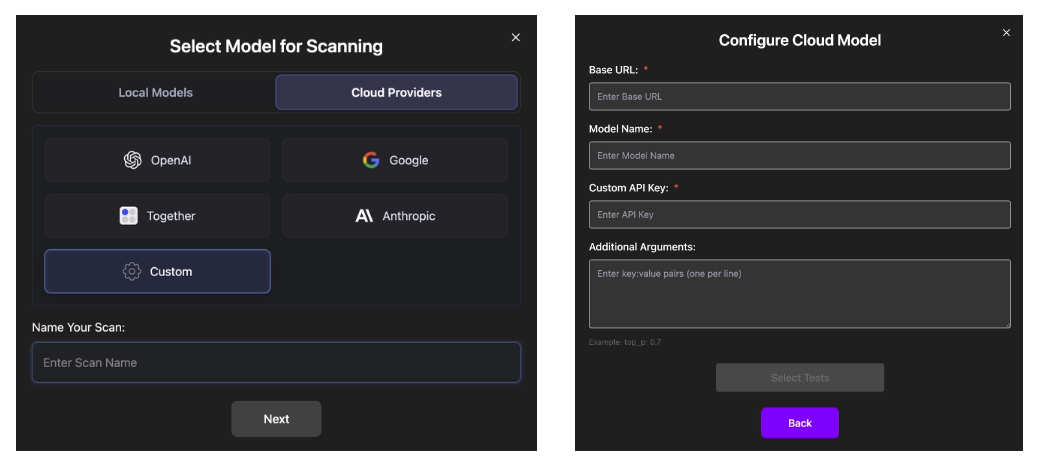
If your model server supports the OpenAI-compatible API, you can connect it using the "Custom Endpoint" option. This works for self-hosted infrastructures or third-party providers that mirror the OpenAI API schema.
Simply choose the "Custom" tab under the "Cloud Providers" and enter the following fields:
- Base URL – API endpoint of your server (e.g.,
https://your-server.com/v1) - Model Name – Identifier expected by your server (e.g.,
my-model) - Custom API Key – Your authentication token for accessing the server
- Additional Arguments (optional) – Extra inference parameters (one per line), in
key:valueformat (e.g.,top_p:0.7)
When set up, VirtueRed platform will invoke your model using standard OpenAI-style calls, just as it would for built-in providers.
Support
If you need further assistance, please contact our support team contact@virtueai.com
Thank you for using VirtueAI Redteaming!